NOTE: Cellulant has not paid me to write this post
Cellulant launched Tingg mobile application in November 2019, I attended the launch of the mobile app when the team did a launch session at Swahilipot Hub. The app was initially called Mula during the Beta period of the launch.
The app allows a user to be able to pay for a number of services; PayTV, Buy Artime (across networks), Gas (order gas though it works in Nairobi as of writing of this post), Power (electricity tokens) and water services. This set of features are what will make some call Tingg a super app. Is it a super app already?
You can learn more about super apps here from a talk by Connie Chan of a16z (Andreessen Horowitz Venture Company)
Setting up my account was super easy, all I needed to do was upload a photo of my national identity card and smile using the front camera. Super impressed!
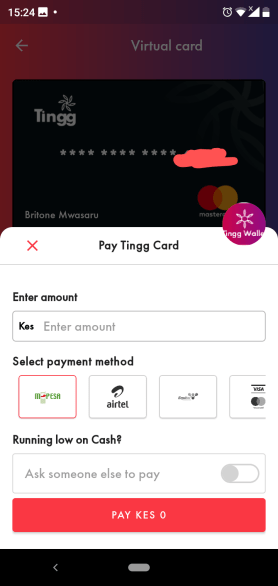
Tingg launched with a virtual card (mastercard) with an emphasis on security as the card is not connected to your bank account. The card is one of the features that attracted me the most as I used it to pay for online services like Facebook/Instagram ads. I say used because the virtual card feature has being frozen as at the time of writing this post.
Here is me making a Facebook ads payment on the day of launch
You can top up the card through a number of options; M-Pesa, Airtel money, Equitel, VISA and DTB Bank. There is an option to ask someone else to pay for you when you select mobile payment as the top up option. This allows you to select a contact that will get a STK push to confirm payment. I have used this feature, what are friends for 😉
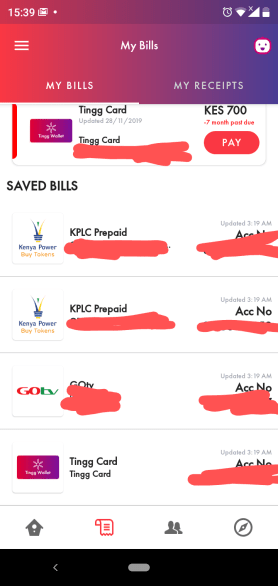
The other feature I use a lot is to make PayTV payments. I like the reminders, from Tingg Assisant, that are sent to my phone as SMS and within the Tingg App. The app allows me to add my PayTV subscription details and electricity meter number so I don’t have to remember or re-enter every single time I need to make payment.
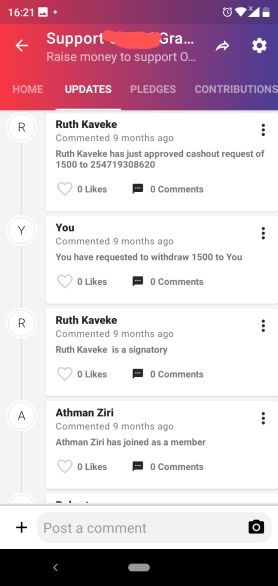
The one feature I don’t see advertised or marketed much is group savings (chama). The mobile app allows you to create a fundraising or savings campaign and invite friends to participate. I did try it when one of my friends lost his grandfather. The app allows you to select people who can confirm withdrawal of money. This is like bank account signatories. This is something I look forward to see banks adopt when group bank accounts embrace mobile technology.

You can see a timeline of activity with the group as shown below
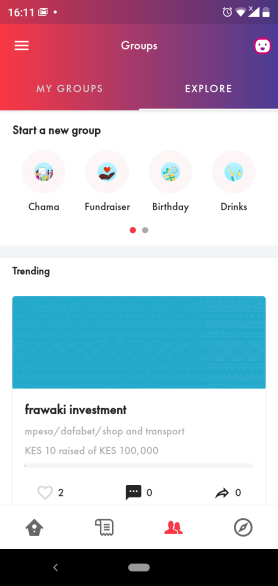
You can see different fund raising campaigns running on Tingg under the explore tab. See screenshots below
Customer support can be accessed through the support feature at the top right section of the part, the emoji icon. The support previously was slow but the response time has improved significantly. I have an advantage in the sense that I can easily access the Tingg customer service team as I personally know some of the team members (that does not inform this post).
There are a number of things I am not impressed with in the app:
- Time – time can be a hard thing to get right. In the group savings screenshot I shared at the top it says 21 min ago but the group was created 6 months ago and that is when the last activity was in the group. In the saved bills screenshot you will notice the timestamp on each bill as it was updated in the AM today but I didn’t make any change. I might be missing something here. Does the app check for billing details every morning?
- Notifications from the app – when I make payment for electricity bill I can see the notification with token details when I pull down the notification bar but I cannot tap on the notification to see more details. I have to wait for a text message to get the token details.
- Receipts – I cannot see all bills (under my receipts) I have made through the app. I can only see my last payment. Keeping a track of these would be beneficial for my any record keep and budgeting purposes.
What would I add Tingg to increase engagement and get more users? Is this what they call growth hacking?
- Tickets – I would partner with event managers or existing ticketing platforms and allow Tingg users to pay for tickets through the app. If partnerships is difficult, I would create an events ticketing platform for event managers. Events are the thing many of us attend more often leading to more engagement on the app.
- E-Commerce – at the time of writing we are faced with the Covid-19 pandemic, it would be perfect to add e-commerce through partnerships with supermarkets, butcheries, restaurants and other essential businesses we interact with.
- Wealth/Finance management – allow a user to save money and go further to invest the money. Invest can be made with yearly interests with restrictions on withdrawals. Other investment options can be introduced to the app users.
I must say Tingg is still new. I am here making suggestions as an outsider with no internal knowledge of what the product team knows. Please leave your comments about your experiences and suggestions below this post 🙂


 britone mwasaru
Leave a reply to Antony Wugoma Cancel reply